InTorry on your phone
Find a product. Check stock. Save the change.
Browse your company's products, search by SKU or scan a barcode, and adjust quantities from your Android phone.
Use your existing InTorry email and password. Your company's products, access permissions and stock are shared with the web app.
Download the latest package
Version 1.20261107.1054 · Build 32
Exported 2026-11-07 · APK · 29.0 MiB
Android 9 or newer
Open this page on your phone to download and install the app directly. This package is not installed through Google Play.
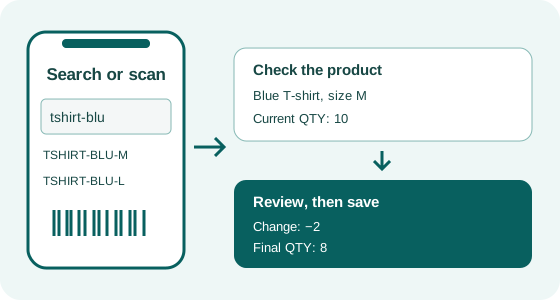
Search or scan
Type part of an SKU for suggestions, using small or capital letters. Or scan an SKU, EAN, UPC or FNSKU barcode to find a matching product.
Browse your inventory
Navigate the tag hierarchy, view product pictures and quantities, and check Product Events. Your personal ToDo list is available from the app menu.
Adjust quantities
Review the product, enter the change and check Final QTY before saving. The same InTorry stock and FIFO rules apply as on Cards and Products List.
Start with your existing account
Download the APK, install it and log in. If you belong to several companies and do not enter your own company automatically, choose the company you need.
Finding or scanning a product only opens its details. Stock changes when you confirm an adjustment with Save.
Installation & Help Forum